A glovebox full of receipts, turned into a service record.
Scan the receipt before you drive off and it's logged: date, mileage, every part, what you paid. Years of fading paper become one record you can search, total up, and print the day you sell.
Free to download · No ads · Works offline · km or miles · 18 currencies · Bahasa Melayu
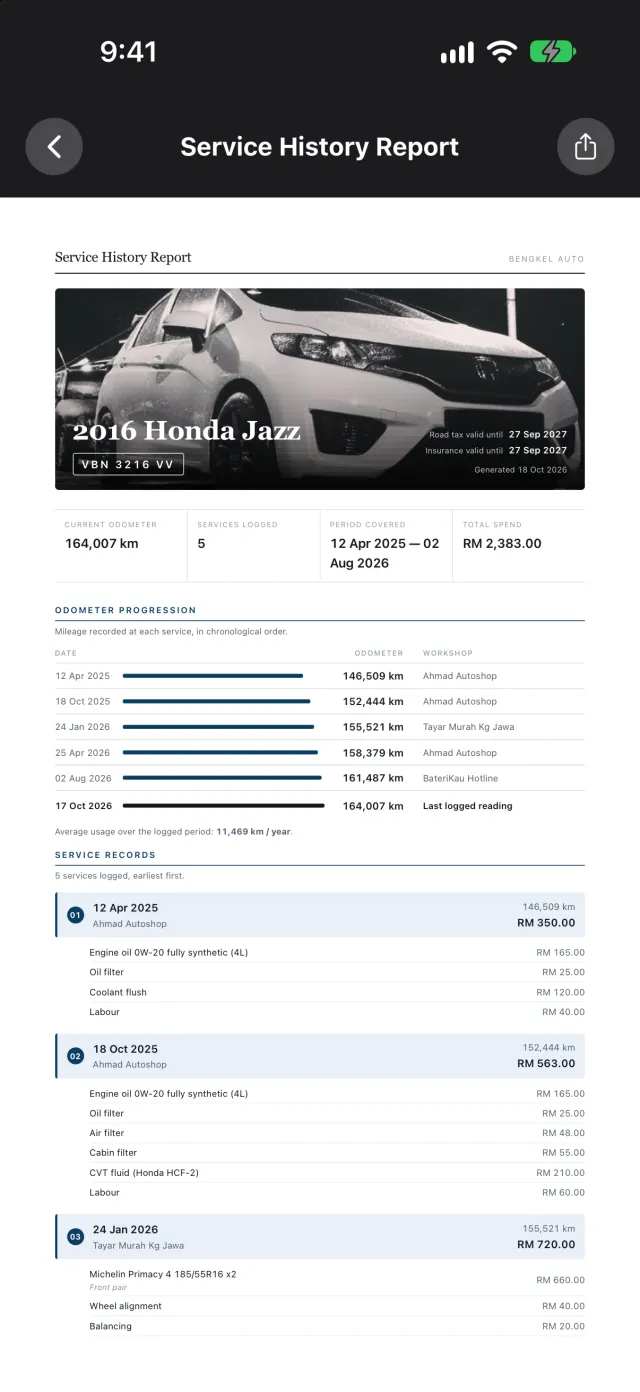
Service history report, as a PDFPro
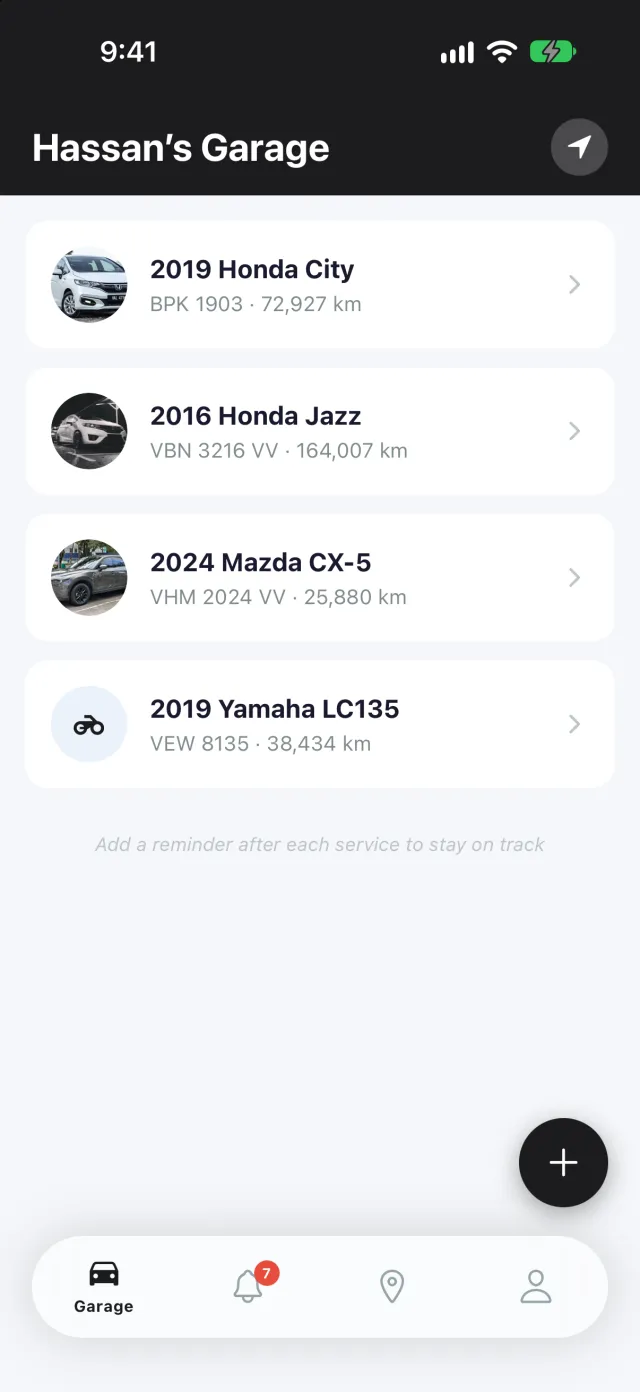
Every vehicle, in one place.
Manage all your vehicles' service records in a single garage. Cars, motorbikes, EVs, each with its own history, reminders and running costs, so nothing gets mixed up between the family cars.
- Unlimited vehicle types, one garage
- Plate, mileage and next-due status at a glance
- Tap any vehicle to open its full history
Your glovebox is not a filing system.
Thermal paper fades to blank in about two years. And the moment the history actually matters, a warranty claim, a mechanic asking when the belt was last done, a buyer knocking money off, the answer is somewhere in that pile.
In the glovebox
- Ink faded off the paper
- “Was that last year, or the year before?”
- No idea what the car has cost you
- Nothing to show a buyer
In Bengkel Auto
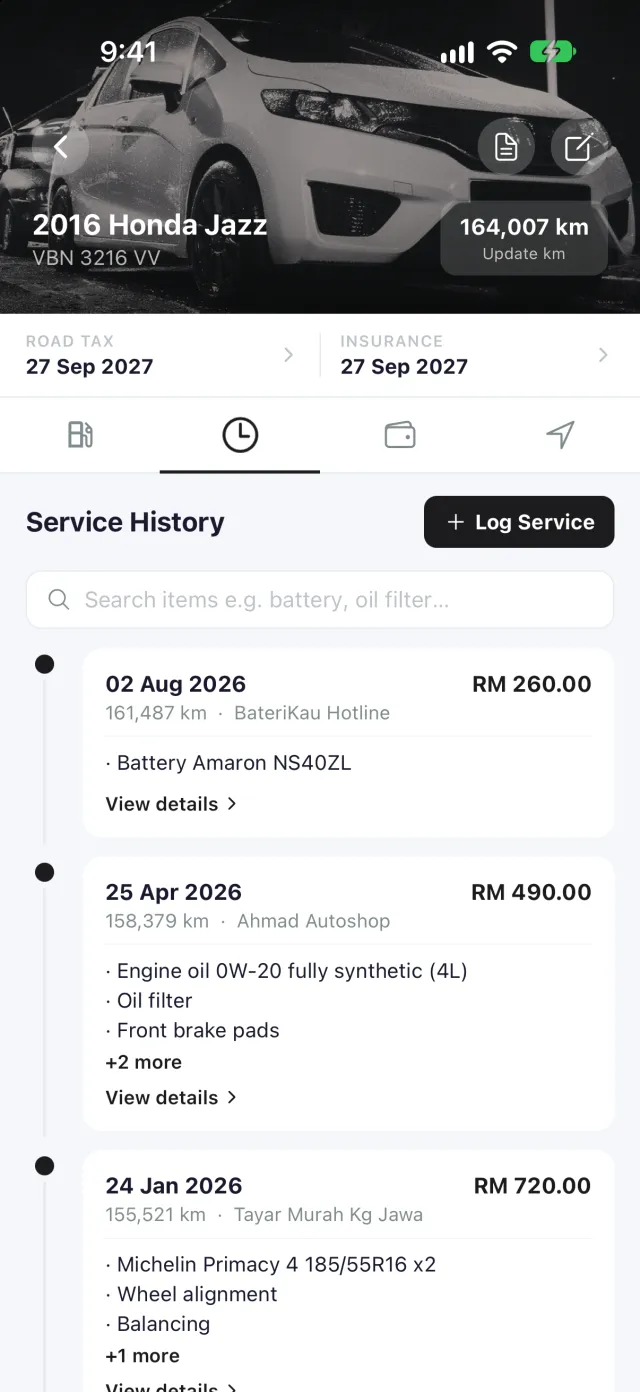
- Every visit, dated and searchable
- Every part and price, line by line
- Lifetime spend, totalled per car
- A PDF record you can hand over
Just scan it.
Crumpled receipts? No problem. The slowest part of keeping records is typing them in, which is why most people never start. So don't type: point the camera at the invoice before you drive off.
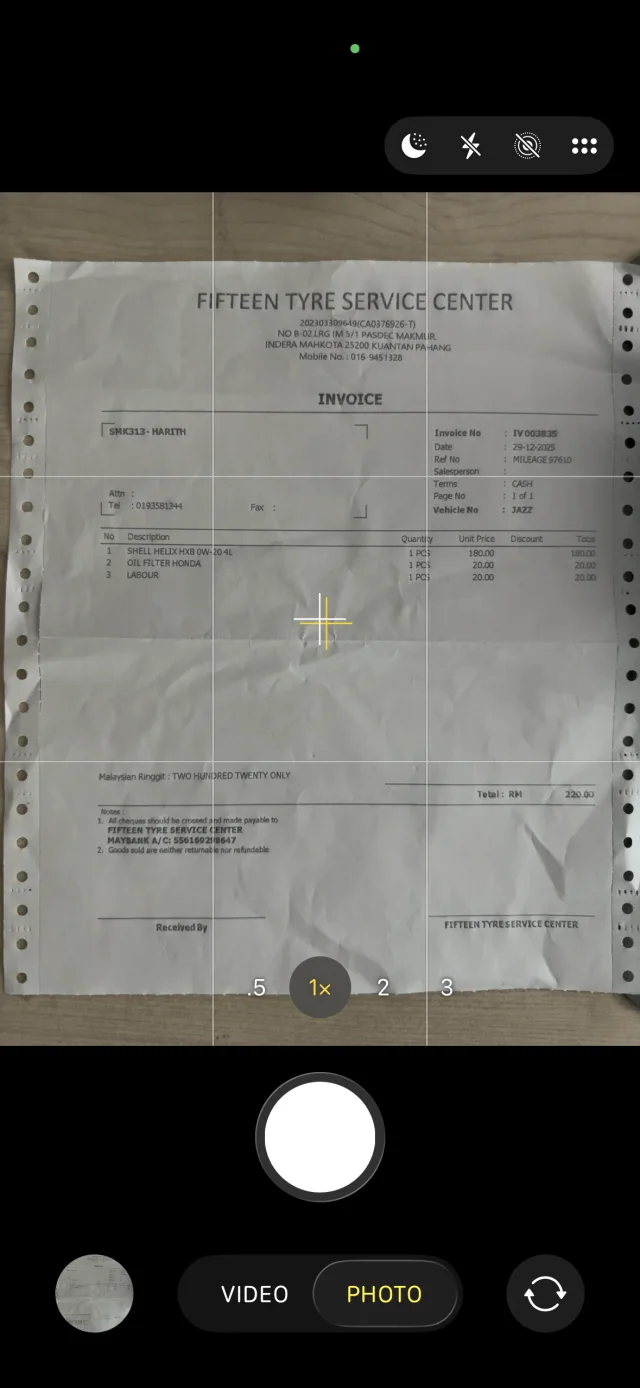
What they handed you A creased invoice, three items, one total.
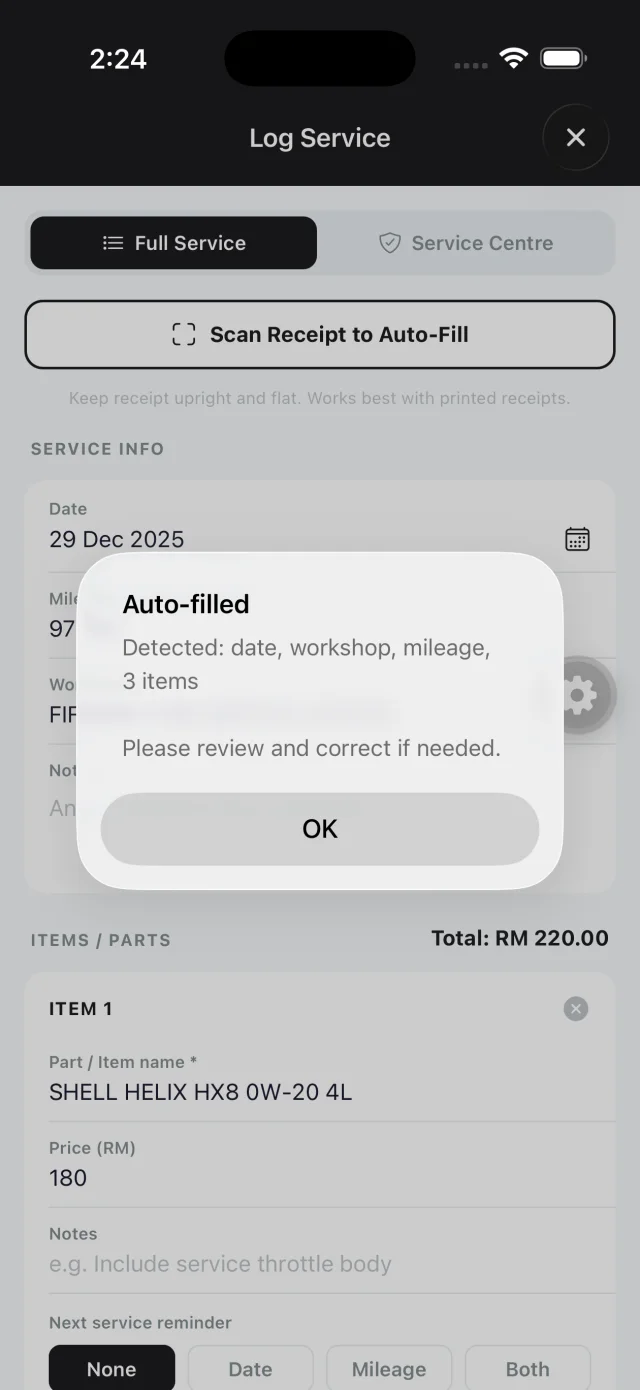
It tells you what it found Review a short list instead of typing one.
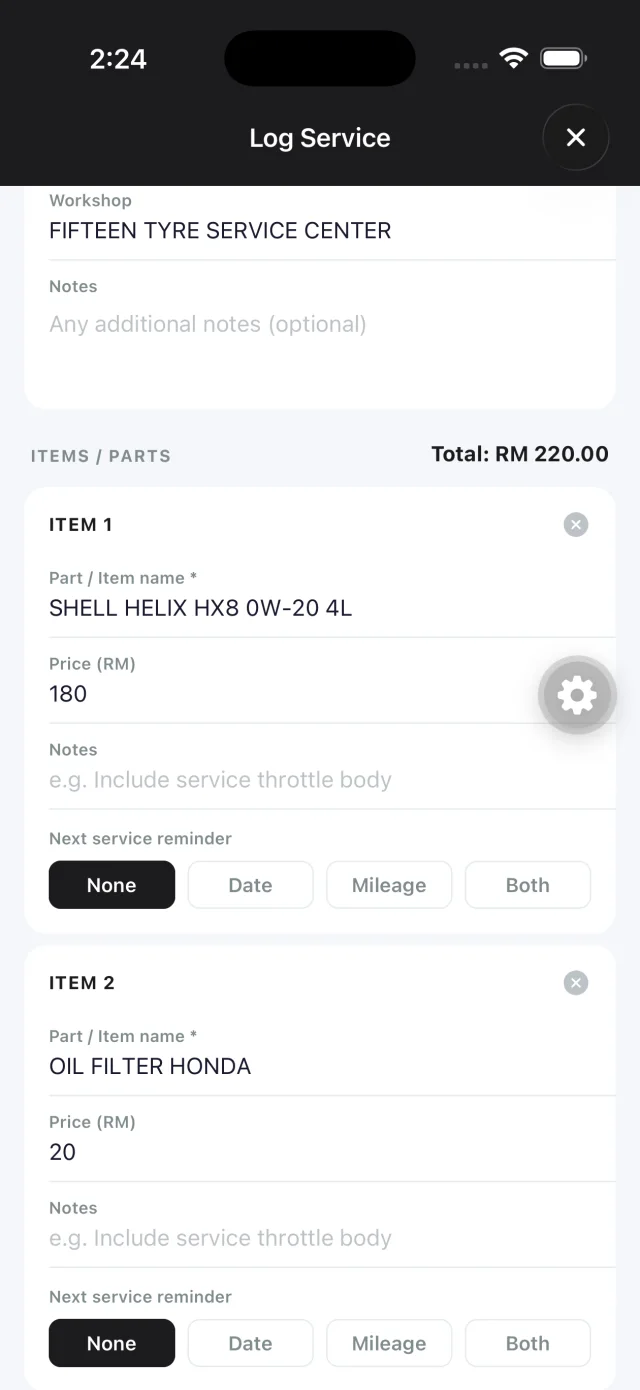
The whole visit, logged Workshop, date, mileage and every line item.
Invoice came as a PDF? Import it from Files or Google Drive, or share a receipt straight from Setel or your banking app. Bengkel Auto works out whether it's fuel or a service, and which car it's for.
Get in and drive. It logs the trip.
Trips start when your phone connects to the car's Bluetooth or CarPlay and end when you switch off. Each trip measures its own distance, so your mileage and reminders stay current without a single odometer photo.
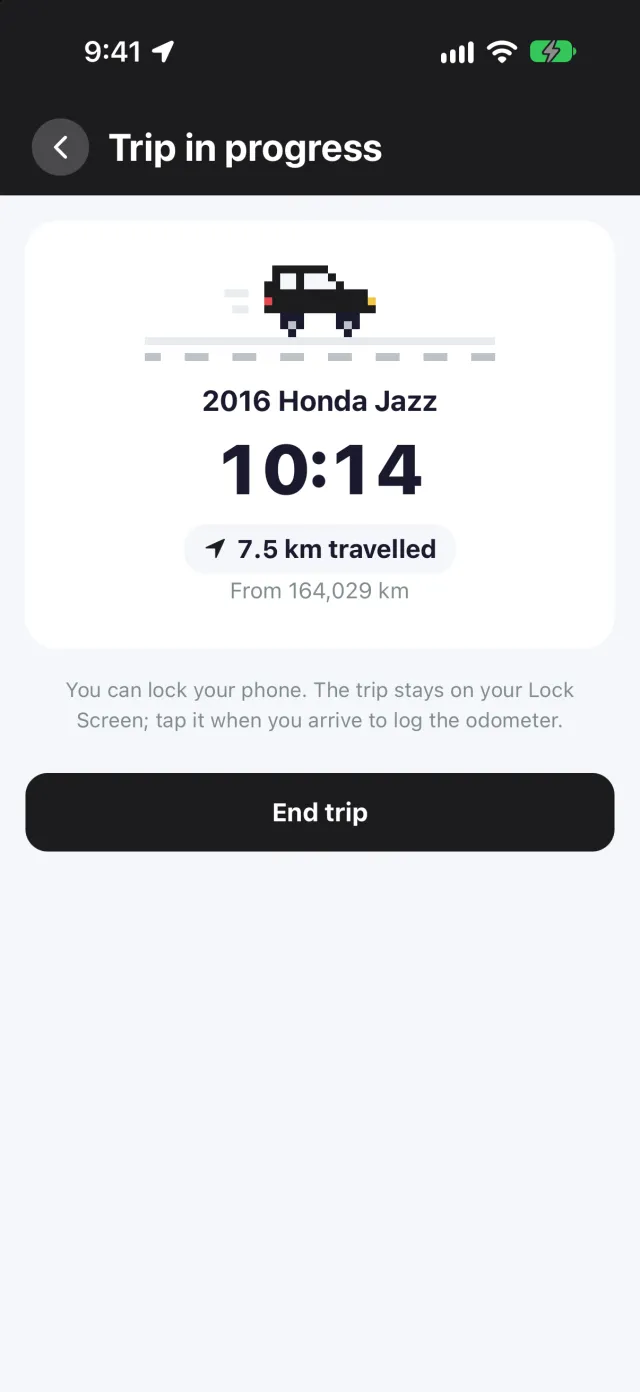
It starts with the car Bluetooth or CarPlay connects, and the trip runs on your Lock Screen.
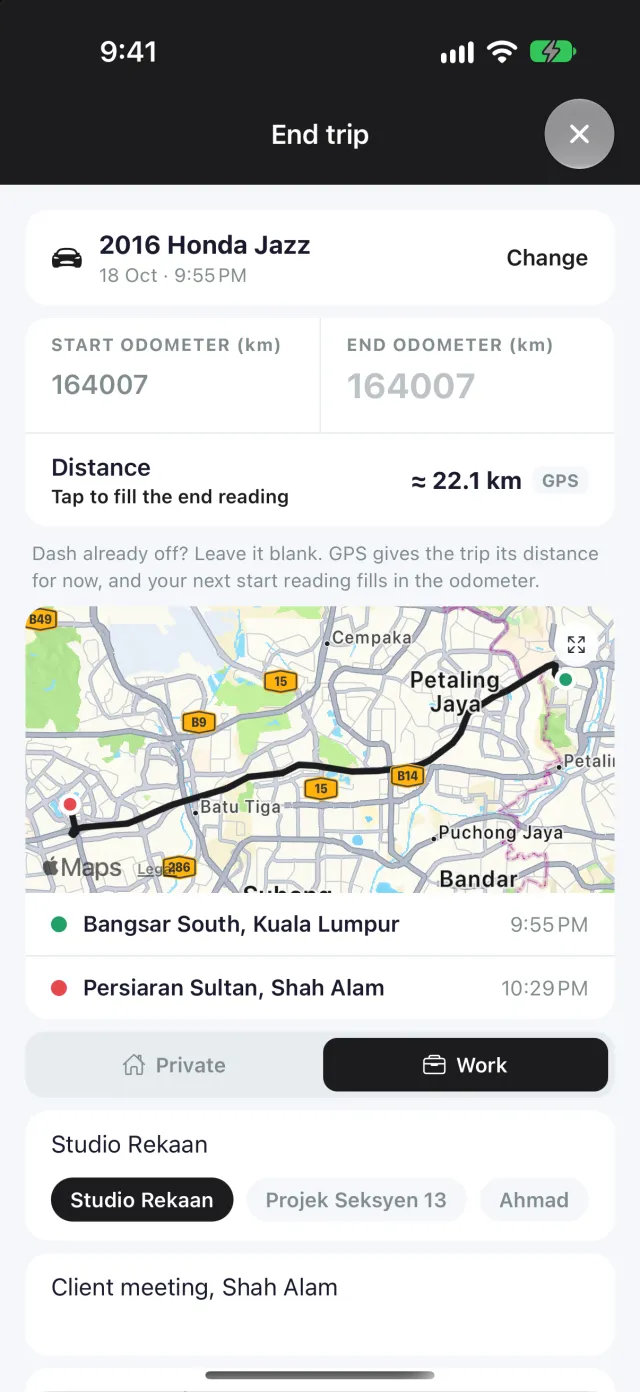
Every kilometre, measured GPS measures every trip for free. Its route on a map comes withPro
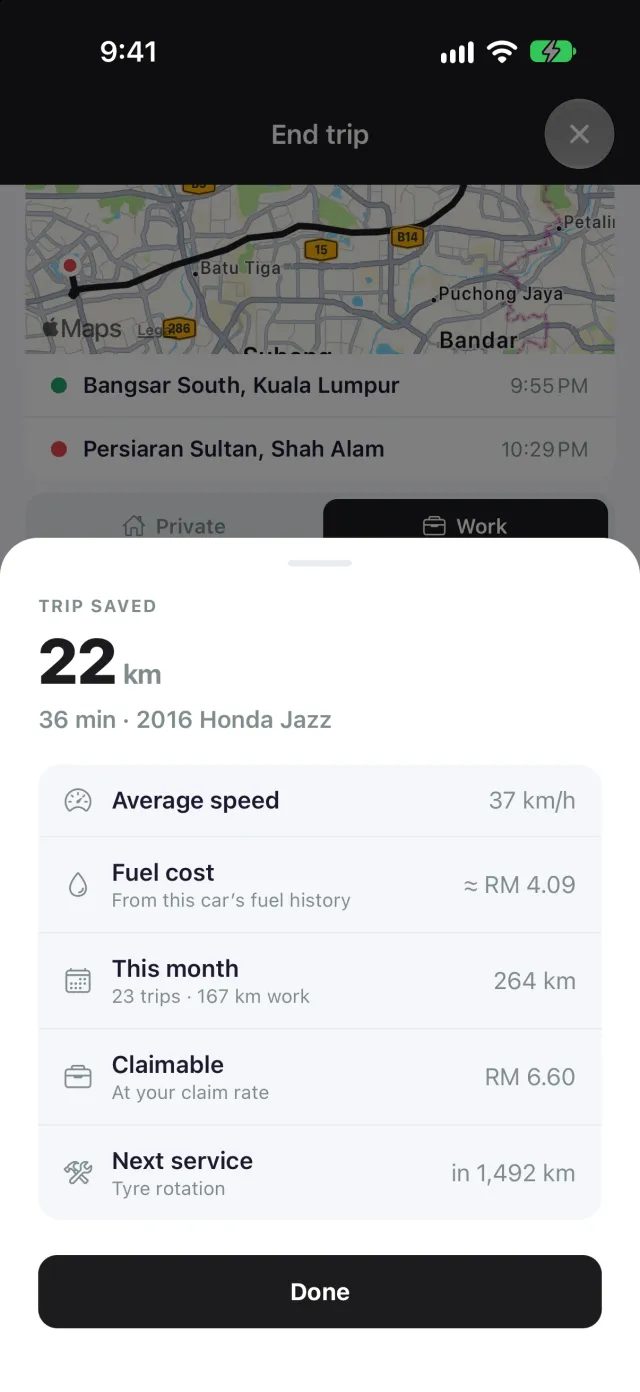
Every trip, summed up The fuel it cost, what you can claim at your rate, and when your next service is due.
- Your location never leaves your phone: GPS runs only during a trip, and the route stays on the device
- Remember where you parked: the bay, a photo of the sign, shared with whoever you're meeting
- Split, merge or move a trip to the car it was really in
- Claim report as a PDF or CSV, and a map of each route Pro
What your car actually costs.
Lifetime spend per vehicle, and a fuel log that tracks weekly and monthly costs, so you always know where the money's going. Petrol, diesel or electric, charged at a station or at home.
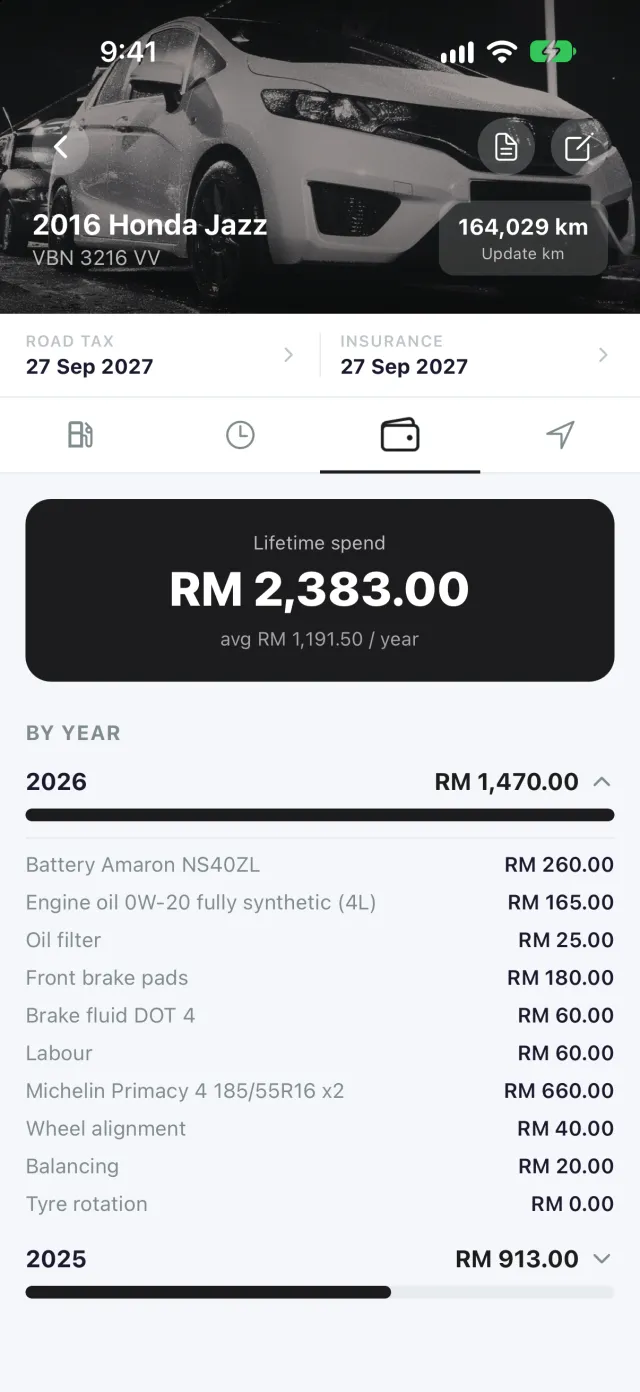
Track spending
View your vehicle's lifetime maintenance expenditure, broken down year by year, so servicing costs are never a surprise.
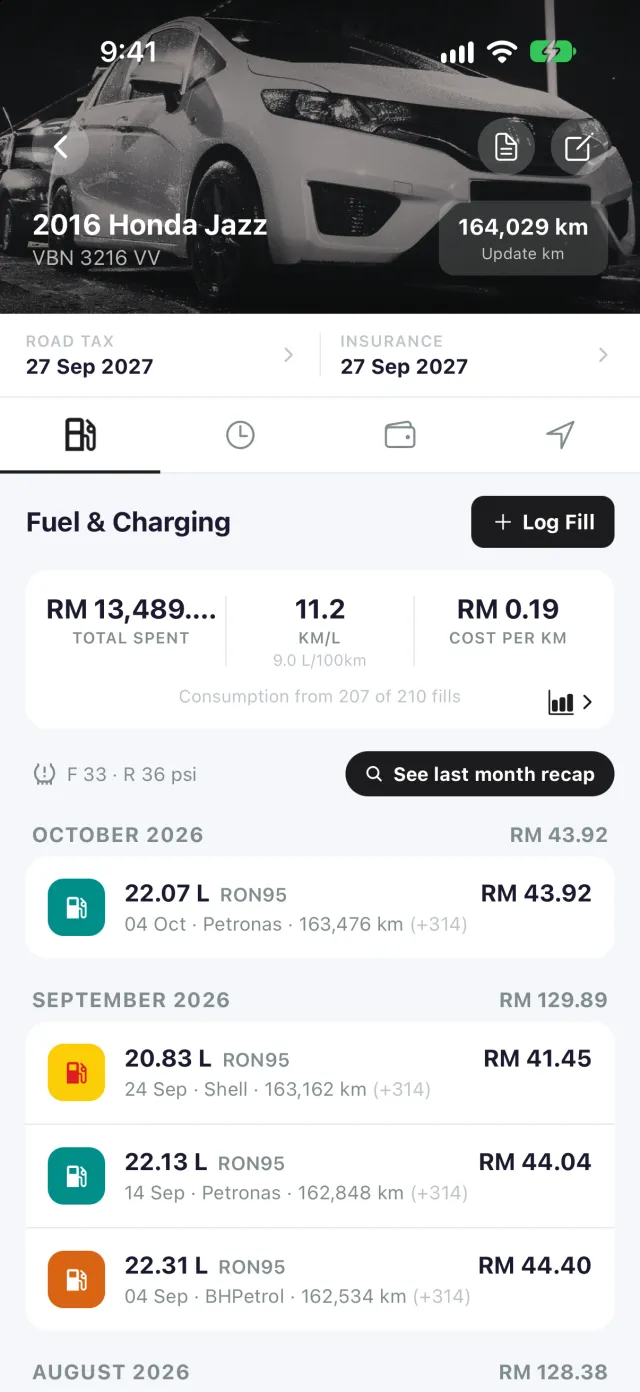
Track fuel expense
Log every fill and see cost per km, calculated honestly: full tank to full tank. After each tank, see how it did against your usual.
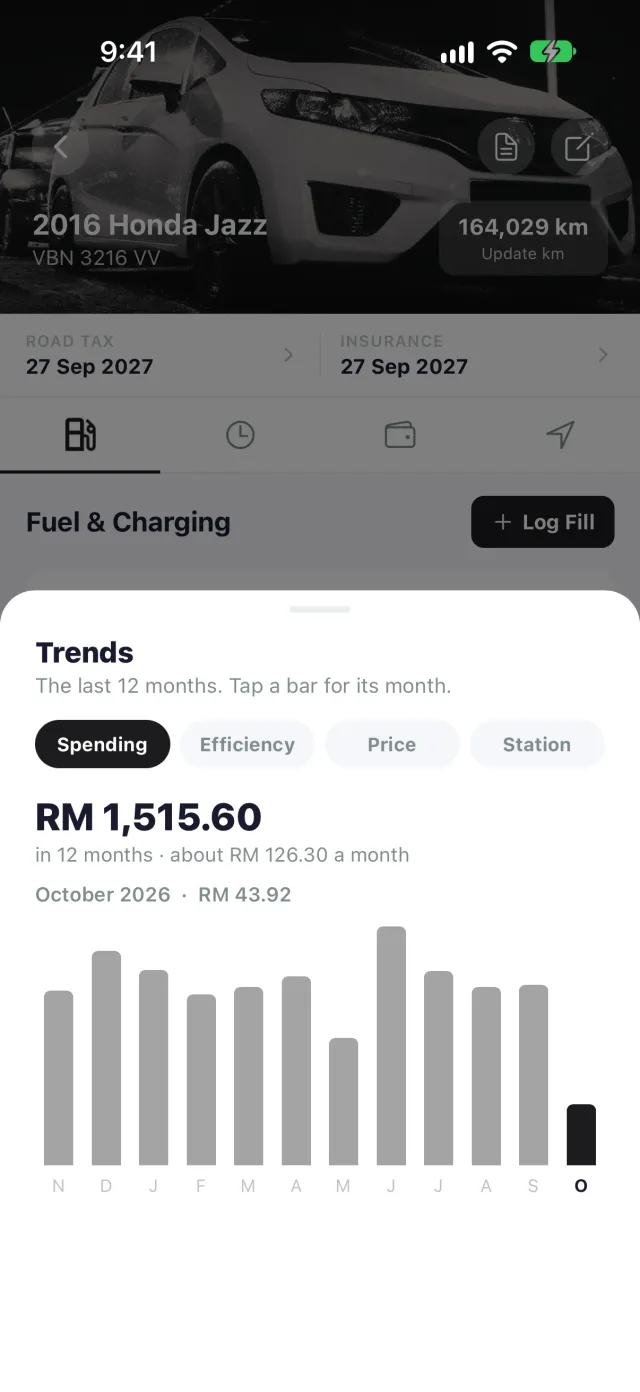
See the trends Pro
Twelve months of spending, efficiency and price per litre, and which station your car goes furthest on.
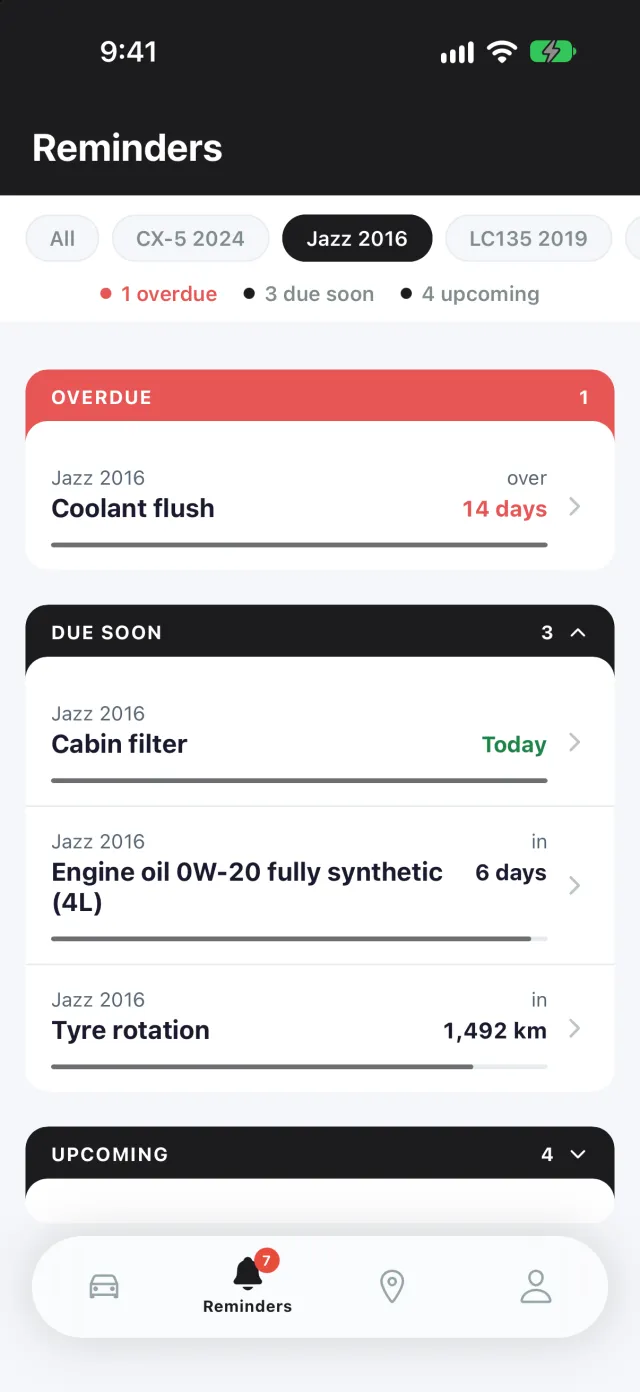
Set it once. We'll remind you.
Automated alerts for upcoming and overdue maintenance, by date, by distance, or both. The next oil change, the tax and insurance renewals: you get told first, not the workshop.
- A distance reminder knows roughly when you'll get there, from how much you drive
- Tap a reminder to see what that job cost you last time
- What's due next on your Home Screen and Lock Screen
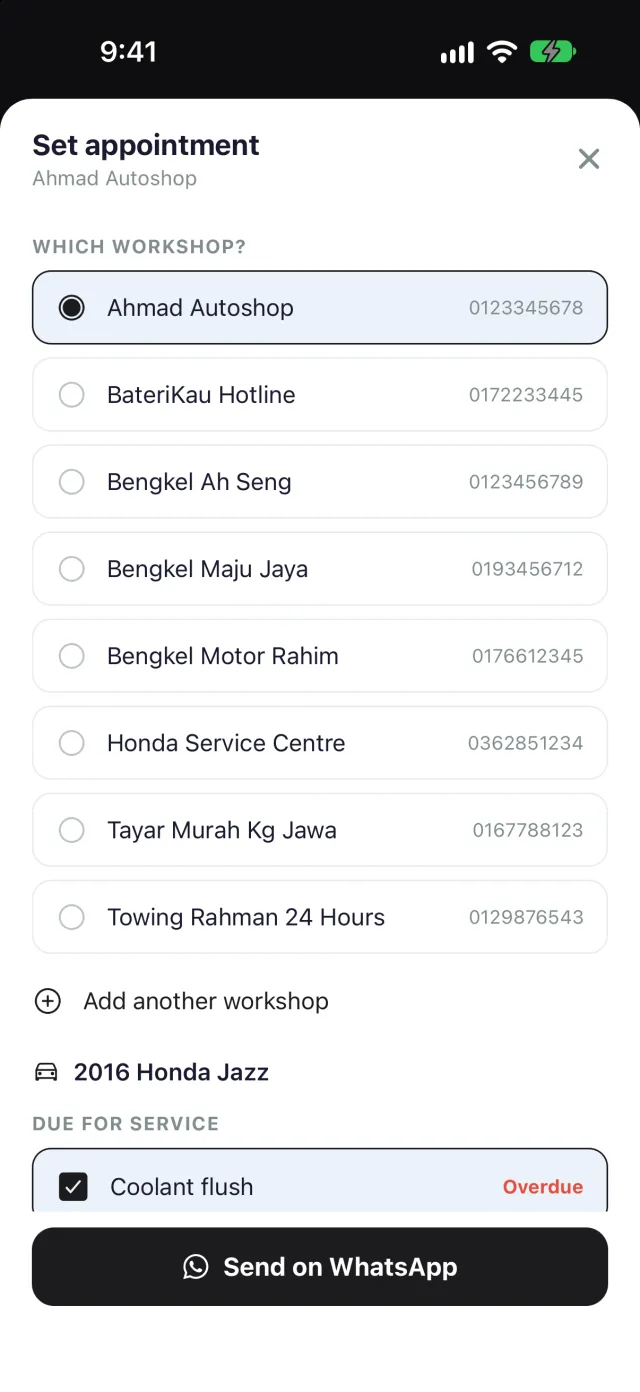
Book it from the reminder.
When a service comes due, tap Set appointment. Pick your workshop, and the job is already ticked, with anything else due on that car beside it. WhatsApp opens with the message written, asking for a price with labour.
- No workshop saved yet? Add it right there, with its number
- Your workshop doesn't need the app, just WhatsApp
- You see the message and send it yourself
Gain your buyer's trust.
Hand over the whole service history as a clean PDF: every visit, every part, the full odometer progression from the day you started logging. Proof that holds its price.
- Odometer progression, charted visit by visit
- Every service itemised, with cost
- One tap to share, no app required to read it
- PDF export is a Bengkel Auto Pro feature
- Or transfer the car, history and all, to the buyer's own Bengkel Auto account
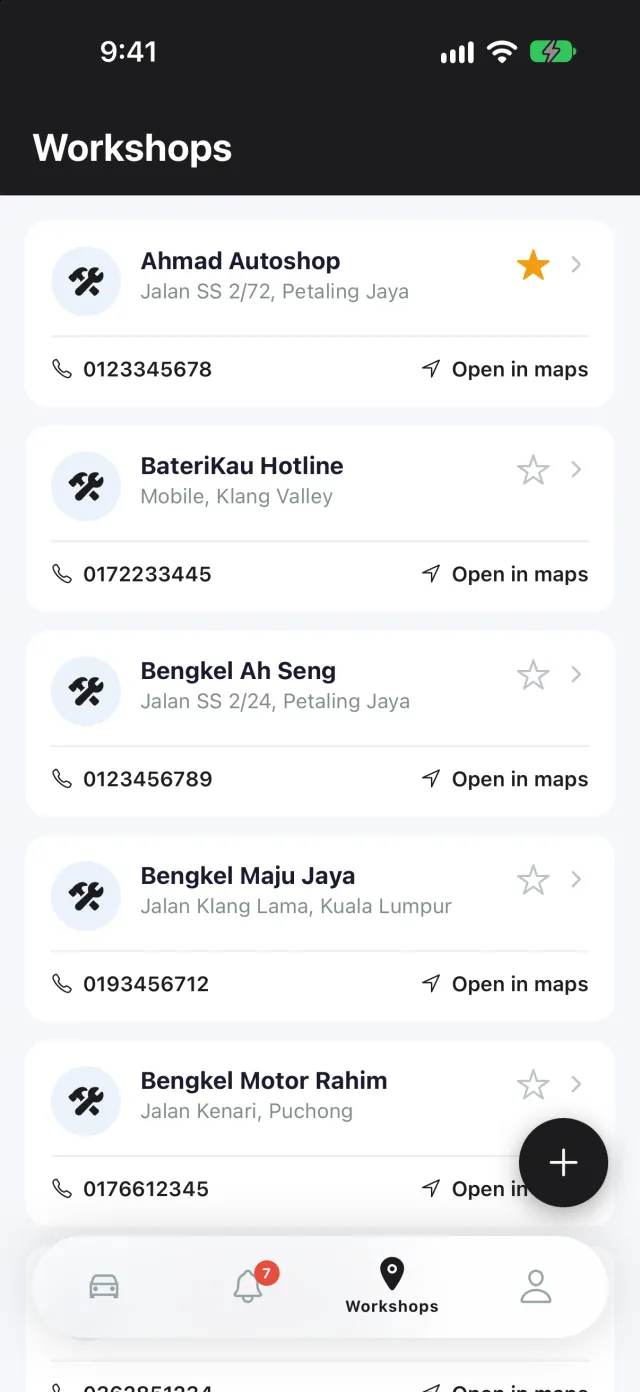
Every mechanic's number, one tap away.
Keep your favourite mechanics, tyre shops and emergency contacts handy. Save them once, then call or WhatsApp straight from the app when something comes up.
- Scan a workshop's QR code to add it, name and number filled in
- Open any workshop in Waze, Google Maps or Apple Maps
- Run a workshop? Get your free QR code
Made for how you drive.
Widgets
What's due next, or one car at a glance with buttons to log fuel or a service. iPhone and Android.
Bahasa Melayu
Every screen, reminder and notification, in English or Bahasa Melayu.
Dark mode
Follows your phone, or pick Light or Dark, with seven theme colours to choose from.
Your receipts, your folder
Export every receipt photo to Files, iCloud Drive or Google Drive, sorted by car.
Bring your history
Import fuel logs from a CSV, Fuelly included, and workshop invoices from PDF.
Anywhere you drive
Kilometres or miles, litres or gallons, and 18 currencies.
Start free. Upgrade only if you need to.
Free
Everything most drivers need.
- 1 vehicle
- Unlimited service records
- Reminders by date and mileage
- Fuel and charging log, spending tracker
- AI receipt scanning, subject to a daily fair-use limit
- Workshop contacts, call or WhatsApp
- Trip logging with GPS distance, automatic on Bluetooth or CarPlay
- Set appointment: book your workshop on WhatsApp
- Widgets, dark mode, Bahasa Melayu
- km or miles, litres or gallons, 18 currencies
- No ads
Bengkel Auto Pro
For bigger garages and record keepers.
- Up to 10 vehicles
- Cloud backup and cross-device sync of your data
- Cloud backup of receipt and vehicle photos
- PDF service report export
- Fuel trends: 12 months of spending, efficiency and price
- Trip claim report (PDF or CSV) and route maps
- Imported invoice PDFs kept with the service
- Everything in Free
- 14-day free trial on the monthly plan
- Or pay once with Lifetime: RM149.90
On the free plan, everything you record stays on your device and is not backed up. Only Bengkel Auto Pro backs your data up to the cloud. The free trial is for new subscribers to the monthly plan, once per Apple Account or Google account. If a trial or subscription ends, nothing is deleted: extra vehicles become view-only, and everything backed up while you had Pro, plus one final sync the next time you open the app, is restored if you reinstall or change phone.
What drivers are saying.
“so far so good. thanks creator 👍”
Azreen Zulhelmy · Google Play“terbaik. senang digunakan”
Hakim Zakaria · Google Play“terbaikkk”
Ariff Hafiz · Google Play“Very useful app for keeping track of car service history and maintenance. Easy to use and helpful for monitoring service intervals.”
Jasad Seni · Google PlayBefore you download.
Getting started
Is Bengkel Auto a digital service book (buku servis)?
Yes. Bengkel Auto replaces the physical service book your workshop stamps, keeping every visit, part and cost as a searchable digital record instead of a paper booklet that fades or gets lost.
Do I need an account to use Bengkel Auto?
Yes, you'll need to sign in, so your data is tied to your account. Once signed in, the app works fully offline for day-to-day use, with your data stored on your device. Only Bengkel Auto Pro backs it up to the cloud.
Can I bring my history over from another app?
Yes. Import your fuel history from a CSV file, including Fuelly exports, and you see every row before anything is saved. Workshop invoices saved as PDFs can be imported too, from Files or Google Drive, and the service form fills itself in.
Does it work for motorcycles and electric cars?
Yes. Cars, motorcycles and EVs each get their own history, reminders and running costs. For an EV, log charges at a station or at home, with the battery % before and after, and the efficiency is worked out without charging to full.
Is the app available in Bahasa Melayu?
Yes. Switch the language in Settings and every screen, reminder and notification follows.
What units and currencies does it support?
Kilometres or miles, litres or gallons (with mpg), and 18 currencies, so it works whichever country you're driving in.
Is there a widget?
Yes, on iPhone and Android: see what's due next on your Home Screen, or one car at a glance with its mileage, road tax, fuel efficiency and buttons to log fuel or a service. On iPhone, reminders also fit on the Lock Screen.
Trips and your location
Does trip logging track my location all the time?
No. GPS runs only while a trip is running, to measure its distance. The route stays on your phone and is never uploaded; on Bengkel Auto Pro, only the trip's distance and details are backed up. You can switch automatic trips off any time in Profile, Trips.
How do trips start by themselves?
On Android, pick your car's Bluetooth in the app: a trip starts when your phone connects and ends when it disconnects, and Android Auto works too. On iPhone, you set up a Shortcuts automation once, for your car's Bluetooth or CarPlay, and the app shows you each step. You can also start a trip from Siri, Control Center or the widget.
Can I claim mileage for work trips?
Yes. Mark each trip as private or work, with a client or category, and set your claim rate to see what your work trips are worth. A claim report as a PDF or CSV, and a map of each trip's route, are Bengkel Auto Pro features.
Workshops
How do I book a service with my workshop?
Tap a reminder and choose Set appointment. Pick the workshop and what needs doing, and WhatsApp opens with the message written for you, asking for a price with labour. Bengkel Auto doesn't send anything itself: you see the message and send it.
Does my workshop need the app?
No. Appointments go over WhatsApp and calls go to their number. Workshops can print a free QR code at bengkelauto.com/workshop, so customers scan it to add them in one go.
Your data
What happens to my data on the Free plan?
It stays on your device only. Nothing is backed up unless you're on Bengkel Auto Pro, so if you lose your phone or uninstall the app, that history is gone with it.
Can I keep my receipts in my own folder?
Yes, on every plan. Export every receipt photo, sorted by car, to Files, iCloud Drive or Google Drive. On Android, pick a folder once and new receipts are copied there automatically.
I'm selling my car. Can the history go with it?
Yes. Transfer the car to the buyer's Bengkel Auto account, service history and all; they accept it from their own account. You can also export any car as a spreadsheet, or as a PDF service report on Bengkel Auto Pro.
Plans and pricing
Is AI receipt scanning a Pro-only feature?
No, it's available on every plan, subject to a daily fair-use limit.
How many vehicles can I add?
One on the Free plan (accounts that already held more than one vehicle before this changed keep up to two), and up to 10 on Bengkel Auto Pro, each with its own history, reminders and running costs.
Is there a free trial for Bengkel Auto Pro?
Yes. New subscribers to the monthly plan get a 14-day free trial, once per Apple Account or Google account. Cancel at least 24 hours before it ends (on Google Play, before it ends) and you won't be charged; otherwise it becomes a paid monthly subscription at the price shown.
What happens when my trial or subscription ends?
Nothing is deleted. Vehicles beyond the free limit become view-only, and everything backed up while you had Pro, plus one final sync the next time you open the app, is restored if you reinstall or change phone. Anything you record after that stays on your device only.
Can I pay once instead of subscribing?
Yes. Bengkel Auto Pro Lifetime is a single payment of RM149.90, or the equivalent in your local currency, with no renewals. It stays active for as long as your account exists.
Can I export a PDF service report to show a buyer?
PDF service report export is a Bengkel Auto Pro feature. The report includes odometer progression, itemised services and total spend.
Download Bengkel Auto
Free on iPhone and Android. Start your service record with the next receipt you get.
“Berpuas hati, mudah nak tengok dan mudah sebb scan je auto list dh.”
Chumelz, App Store review, Malaysia